
From First Meeting to First Proposal: A Faster Workflow with ArchiX
In architecture and renovation, the work surrounding a proposal - administrative tasks, documentation, coordination - often takes more time than the proposal itself.
Meeting notes that consume an entire afternoon. Render outsourcing that adds days of waiting and cost before a first presentation can even happen.
This post walks through how ArchiX addresses these bottlenecks from end to end, using a fictional but realistic scenario: an exterior renovation project for Sakumei Junior High School's gymnasium in Kyoto.
A Proposal Workflow, Rebuilt Around ArchiX
From the moment a project comes in to the moment you present, ArchiX's features connect into a single, continuous workflow that eliminates duplicate effort and unnecessary delays.
The five-stage flow:
- Pre-meeting preparation: use AI to prepare efficiently
- Initial meeting: automatic real-time transcription
- Project management: centralize all information by project
- Ideation: use AI chat to build the rationale for your proposal
- Plan development and materials: generate visual references with AI renders
1. Pre-Meeting Preparation
Feature: AI Meeting Notes and Summaries
First meetings are easy to underprepare for. With ArchiX, entering a brief overview of the project is enough for the AI to generate a suggested agenda and a set of questions to cover - automatically. You go into the meeting with a clear structure already in place, rather than scrambling to pull one together the morning of.
In the gymnasium renovation scenario: After receiving an inquiry about exterior renovation from Sakumei Junior High School, the team used the AI Meeting Notes tool to prepare for the initial meeting. The AI surfaced the key discussion points, required materials, and factors to confirm on the day - including slip resistance requirements and budget constraints.
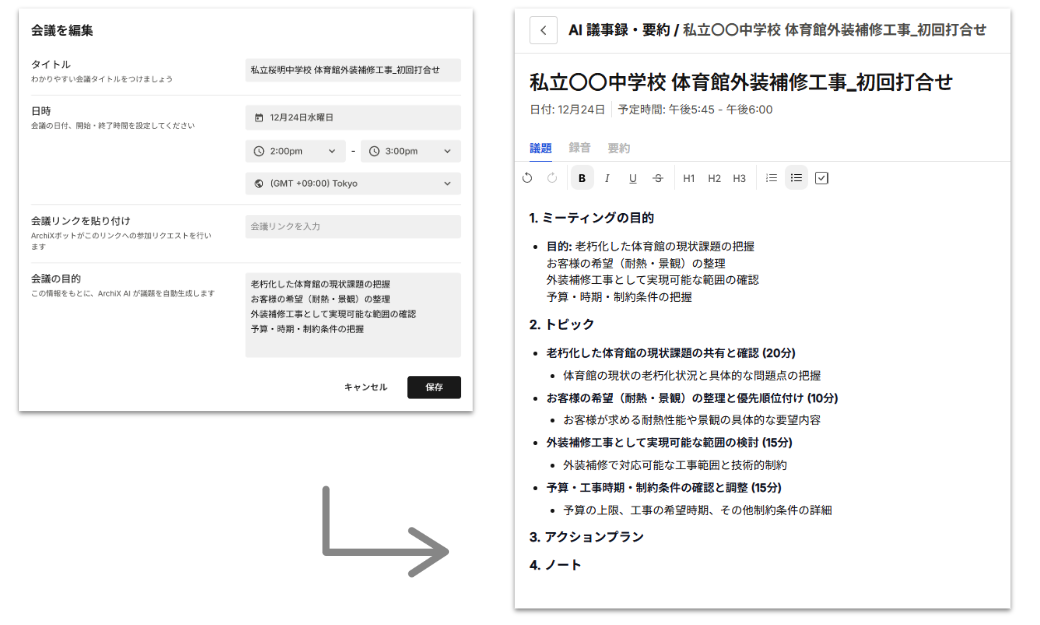 Register the meeting in ArchiX and the agenda is generated immediately
2. Initial Meeting
Feature: AI Meeting Notes and Summaries
Start the recording just before the meeting begins. From that point, you can focus entirely on the conversation. ArchiX transcribes the audio, summarizes the discussion, and suggests next steps - all automatically, by the time the meeting ends.
Sharing the summary with the client or internally is as simple as copying and pasting the output.
- How it works: Click "Start Recording" before the meeting begins. Click "Stop Recording" when it ends. That's the full operation.
- In the gymnasium scenario: Four participants in total - two from the client side, two from the firm. Entering the number of speakers was enough for ArchiX to produce a per-speaker transcript and a clean summary.
 The generated meeting notes and summary
3. Project Management
Feature: Project Management
When project information is scattered across emails, messaging apps, shared drives, and printed drawings, finding the right document at the right time becomes its own job. ArchiX's project management feature consolidates everything - site photos, generated renders, estimates, meeting notes - into a single project view.
For larger projects like a gymnasium renovation, having every team member working from the same, up-to-date information is what prevents miscommunication and keeps the project moving.
- Before: Information spread across email, chat, and paper drawings - retrieval was constant friction.
- With ArchiX: Site photos, renders, and estimates all consolidated by project.
In the gymnasium scenario: When the team needed to reference a high-durability floor wax specification used on a past project, they queried the AI directly. The relevant details came up immediately, without having to track down a senior team member or dig through archived files.
 All project files and data managed in one place
4. Ideation
Feature: ArchiChat
Once the meeting notes and site photos are loaded into ArchiChat, it functions as a project-specific consultant. You can ask it to work through specific questions: "Given what the client said about the budget, what are three renovation approaches worth proposing?" or "What's the strongest rationale for recommending this flooring material given the site conditions?"
The conversation surfaces angles and options that are easy to miss when working alone.
- Before: Reviewing pages of notes, trying to synthesize a proposal direction from scratch.
- With ArchiX: Turn the review process into an active dialogue and arrive at a proposal faster.

5. Plan Development and Proposal Materials
Feature: AI Renders
Waiting several days for an outsourced render is a real problem - not just for your schedule, but for the client's engagement. The longer the gap between meeting and proposal, the more momentum is lost.
With ArchiX, uploading a site photo or a hand-drawn sketch is enough to generate a photorealistic visualization in seconds. The result communicates the value of the renovation in a way that words and floor plans alone cannot.
- Before: Days of wait time and outsourcing cost for a single render.
- With ArchiX: A photorealistic visualization from a site photo, ready in seconds.
In the gymnasium scenario: A site photo of the existing gymnasium - dark, dated, and visually flat - was used as the base. Multiple exterior design directions were visualized and presented at the first client meeting, giving the client something concrete to respond to and accelerating the path to agreement.
 Exterior design visualization generated from the site photo
 High-accuracy color planning simulation reflecting industry-standard paint specifications
What This Workflow Actually Changes
Bringing administrative work, project management, and visual production onto a single platform changes the shape of the work in practical ways:
- Less time on documentation means more time on planning and design.
- Faster proposals mean a stronger competitive position.
- Visual references at the first meeting accelerate client decision-making.
ArchiX is designed for professionals who need both speed and quality. Try it on your next project.
If you'd like to talk through how to apply this workflow to your own firm, or want to see more examples and tool comparisons, get in touch below.