
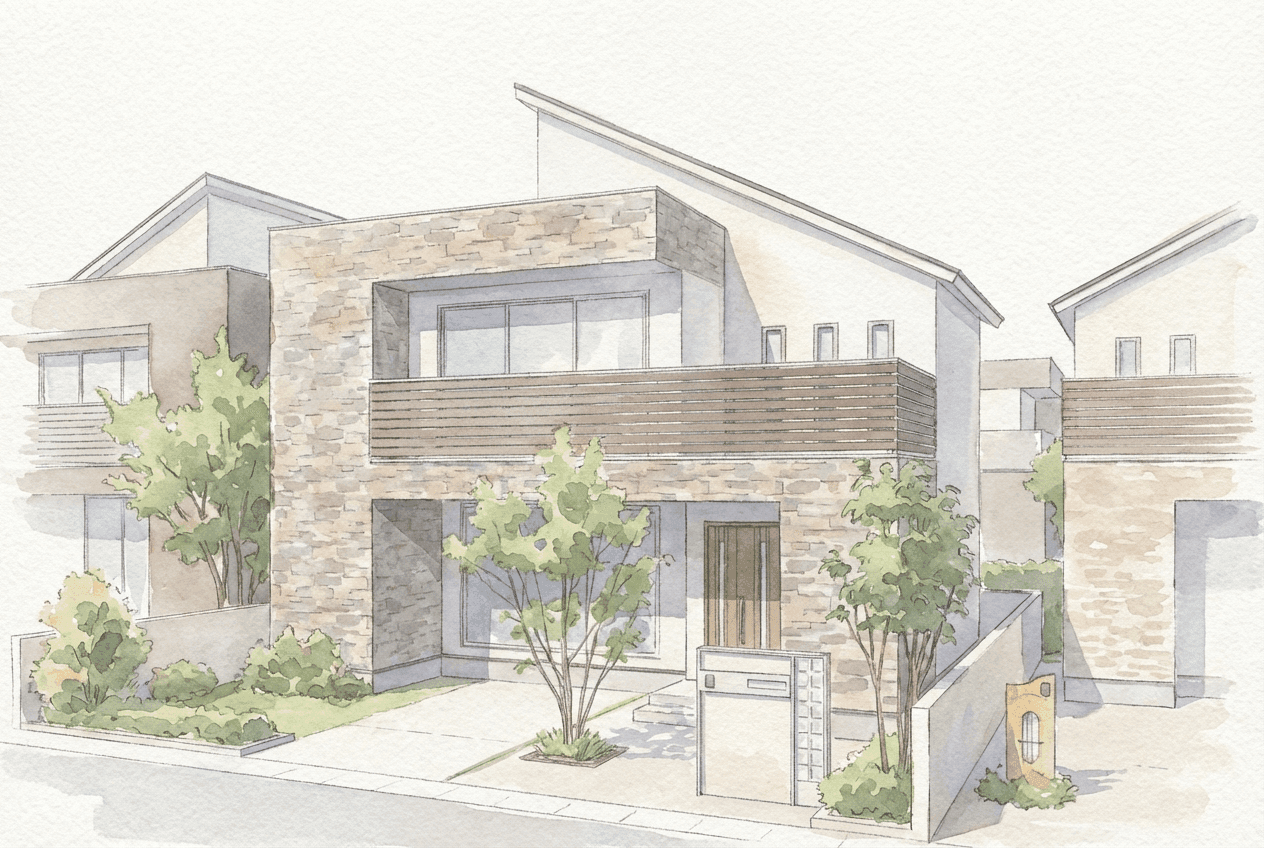
The Case for Hand-Drawn Renders: How a Sketch Style Wins More Clients
You spent hours on a photorealistic render, showed it to the client, and got a lukewarm response. Or maybe you've wanted to bring a hand-drawn warmth to your proposals but don't have the drawing skills - or the budget to outsource them.
If you work in architectural design or sales at a construction or renovation firm, these situations will feel familiar.
There's a growing shift happening in client presentations. Rather than showing a perfectly finished visualization, more firms are deliberately using sketch-style renders to spark imagination and conversation. With ArchiX, you don't need to be able to draw. In seconds, you can generate watercolor and sketch-style renders that look like the work of a professional illustrator.
This post covers why the hand-drawn approach works psychologically, and how to use it as a practical differentiator.
1. Why Hand-Drawn Renders Convert Better
Photorealistic CGI has become the default for architectural presentations, but that ubiquity is part of its problem. A hand-drawn render does something a finished CGI image often can't.
The "Unfinished" Effect Makes Clients Feel Involved
Watercolor and pen sketch styles carry a natural ambiguity - soft edges, slight bleed, a sense of incompleteness. That ambiguity invites the viewer's imagination in. Clients mentally fill the gaps with their own vision of how they'd live in the space.
.png) Hand-drawn style render created with ArchiX - example 1
Hand-drawn style render created with ArchiX - example 1
%20(1).png) Hand-drawn style render created with ArchiX - example 2
Hand-drawn style render created with ArchiX - example 2
The main reasons this style works in client-facing presentations:
- Warmth and approachability: Hand-drawn lines feel human, which is fitting for a space someone is going to live or work in.
- Lower psychological barrier: The deliberate roughness signals that the design is still open. Clients feel comfortable saying "could we try it a bit differently?" rather than assuming everything is already decided.
- Narrative over specification: A sketch communicates the life that happens in a space, not just the dimensions of it.
This matters most in early-stage proposals and renovation projects, where the process of shaping the design together is part of what builds client trust.
.png) Adding color to a black-and-white render is just as fast
Adding color to a black-and-white render is just as fast
2. Three Barriers That Have Kept Firms From Using This Approach
The logic is sound, but adoption has been slow. There are good reasons for that.
Barrier 1: Skill and time required
Producing a hand-drawn architectural render from scratch requires more than just drawing ability. It means understanding perspective theory and having hands-on experience with markers, watercolor, or similar media. That's a specialist skill set that most design and sales staff don't have and can't realistically develop while managing a full workload.
Barrier 2: Outsourcing costs and lead times
Commissioning a professional architectural illustrator typically runs several hundred dollars per image, with turnaround times of several weeks. That's a difficult investment to justify at the competition or early proposal stage, before a project is confirmed.
Barrier 3: Existing software falls short
CAD sketch filters exist, but they tend to flatten linework rather than replicate the expressive quality of a hand-rendered illustration. The result usually reads as digital, not drawn - and clients notice.
ArchiX was built to solve all three of these problems.
3. How ArchiX Converts Any Image to a Professional Sketch Style
ArchiX is purpose-built for architectural work. What used to take days of manual effort now takes minutes.
From flat CAD lines to expressive renders
The process is straightforward. Upload any existing image - a CAD screenshot, a facade elevation, a simple 3D render. ArchiX takes it from there.
- Upload your image: Any screenshot or export from your CAD or modeling software works. JPEG and PNG are both supported. Note that available style options vary slightly depending on the input image type.
- Choose a style: Select from watercolor, marker, or sketch to match the tone of your proposal.
- Generate: ArchiX's architecture-specific model produces a styled image that preserves the original composition, spatial depth, and all key design elements.
.png)
What sets ArchiX apart from general AI tools
General image generation tools often reinterpret your input rather than transform it - you get something that looks vaguely similar but isn't the design you submitted. ArchiX is trained specifically on architectural content, which means window positions, furniture layouts, and structural elements stay where they're supposed to be. The design intent stays intact. Only the visual style changes.
4. Using Emotional Presentation as a Competitive Advantage
For independent firms and regional contractors competing against larger developers, differentiation rarely comes from having a bigger budget. It comes from creating a more memorable, human experience.
The image that sticks
When a client sees multiple presentations in a day, photorealistic renders start to blur together. A single well-executed watercolor render stands out. It's the kind of thing that gets remembered as "the firm with that warm, distinctive style."
Speed as a signal of responsiveness
With ArchiX, generating an alternative style between meetings is genuinely feasible. Showing up to the next meeting with a sketch version of something the client mentioned last time - "I took what you described and put it into a sketch" - builds trust in a way that polish alone doesn't.

The emotional approach many firms assumed required artistic talent is now a practical option for any team.
Photorealism Isn't Always the Answer
What clients are looking for isn't a perfect image. It's a believable picture of their future life in that space.
ArchiX makes it possible to generate hand-drawn style renders without outsourcing, without specialist skills, and without adding hours to your workflow:
- Warmer proposals that invite dialogue rather than closing it down
- No outsourcing costs, with the ability to produce visuals in-house on demand
- Deliberate openness in the design that gives clients room to engage
Add hand-drawn renders to your next proposal and see how differently clients respond.
FAQ
Q: Does it work with any CAD software? Yes. ArchiX processes images rather than native file formats, so exports from JWW, AutoCAD, ArchiCAD, Revit, or any other CAD tool work equally well, as long as the image is in JPEG or PNG format.
Q: Will ArchiX change the floor plan or layout? ArchiX is trained specifically on architectural content and is designed to preserve the structure of the original image. Unintended changes to layouts or key design elements are significantly less common than with general-purpose AI tools.
Q: What sketch styles are available? Three styles are currently available: a delicate watercolor style, a business-ready marker style, and a pencil sketch style suited to early-stage design. Each is suited to a different proposal context or project type.
If you'd like to explore how to apply these techniques to your own workflow, or want to see more case studies and tool comparisons, feel free to reach out.