
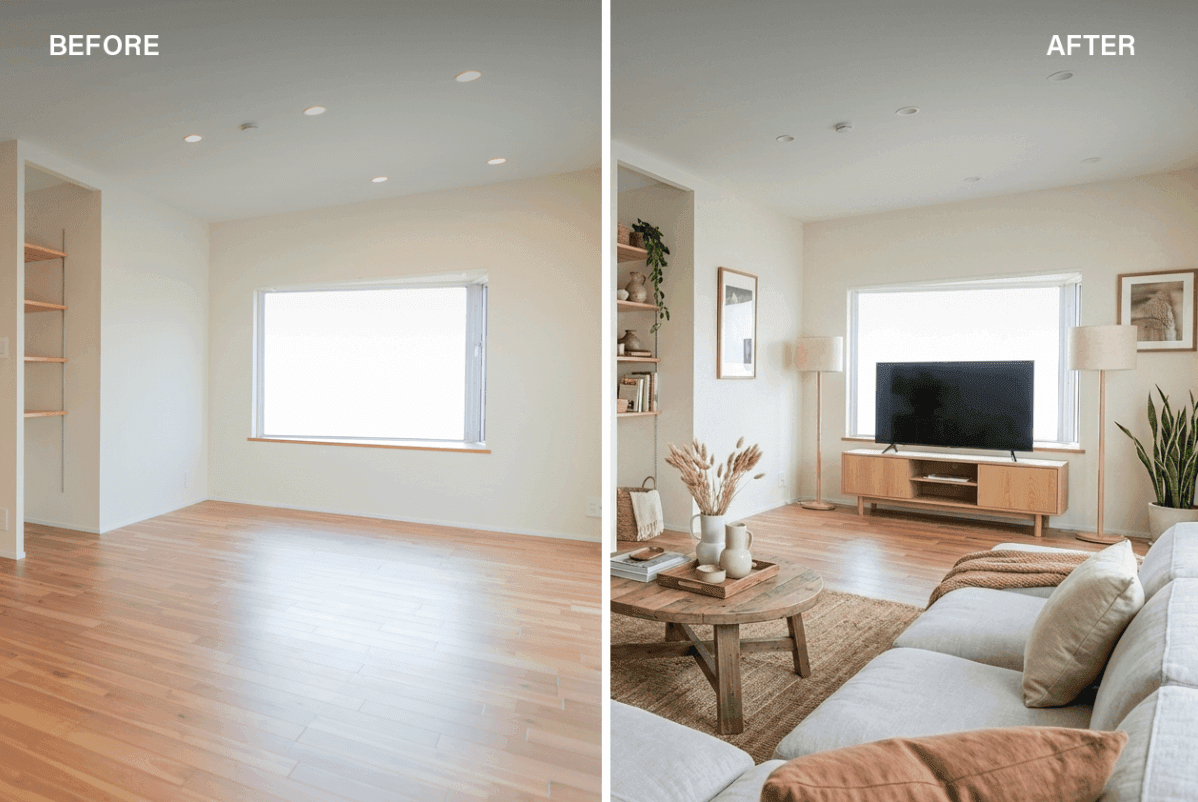
AI Staging: Visualize Any Space Instantly for Real Estate, Design, and Beyond
ArchiX's AI Staging feature lets you furnish, rearrange, renovate, or clear any space using AI - and keep editing the result until it's exactly right.
On April 22nd, we're hosting a free online session: "The Cutting Edge of Same-Day Renders and AI Staging". Join us to see it live.
Why We Built AI Staging
Spatial staging has traditionally been associated with residential property sales - dressing up an empty apartment to help buyers imagine living there. But the need for visual spatial simulation goes well beyond that. Renovation firms, commercial leasing teams, and office relocation consultants all face the same challenge: showing clients what a space could become, before any work begins.
ArchiX AI Staging is built for exactly that. Rather than limiting the tool to home staging, we designed it to simulate how any space - residential, commercial, or office - can be used and experienced. It's fast, cost-effective, and the results are fully editable after generation.
Six Things AI Staging Can Do
ArchiX reads the structure of a space and applies one of six modes depending on what you need.
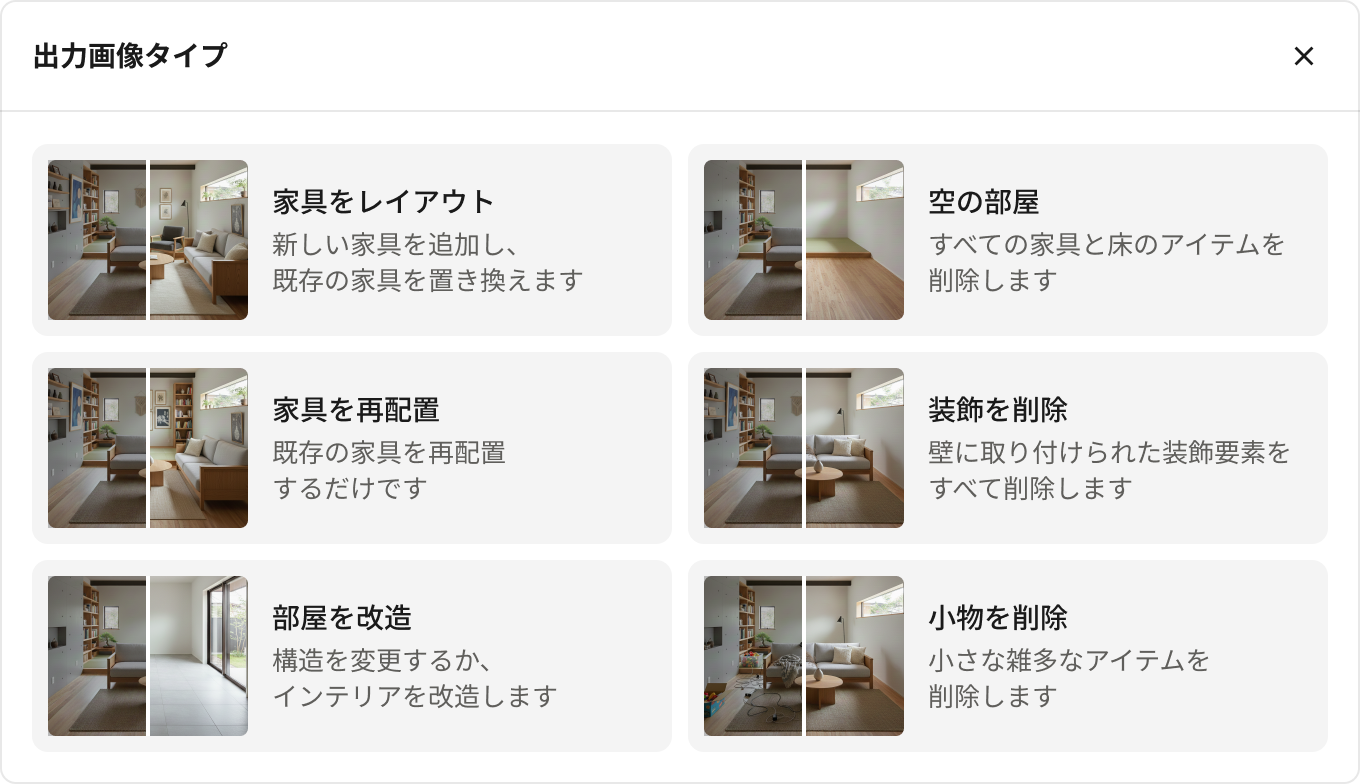
1. Furnish a Space
Place furniture automatically into an empty room based on how the space will be used. Select a space type - living room, dining room, office, retail store, cafe - and ArchiX generates a fully furnished version. This also works on rooms that already have furniture: generate a new layout in a different style to simulate a renovation or refresh.

Residential: Bring a style to life - Scandinavian, modern, natural - and show buyers exactly how a home could feel.

Office: Visualize desk layouts, collaboration zones, and meeting rooms to help clients understand how a space will work.
Commercial: Generate a finished view of a cafe, boutique, or showroom to support leasing conversations and tenant decisions.
Recommended use cases:
- Virtual home staging for vacant residential listings
- Renovation proposals for pre-owned properties showing the after state
- Leasing materials for commercial spaces, tailored to different tenant types
2. Rearrange Existing Furniture
Keep what's already in the space and explore different layout options. This is useful when the furniture stays but the arrangement needs rethinking.

Recommended use cases:
- Partial renovation or redecorating proposals for occupied homes
- Office layout planning
- Retail visual merchandising (VMD) planning
3. Remodel the Room
Go beyond furniture placement and simulate changes to walls, flooring, ceilings, and interior finishes. This is the right tool for showing full renovation scope.

Recommended use cases:
- Full renovation or major refurbishment proposals
- Showing renovation options to buyers considering pre-owned properties
- Comparing design directions and material choices during the design phase
4. Empty the Room
Remove all furniture, appliances, and objects from a photo to create a clean, empty version of the space.

Recommended use cases:
- Showing buyers what an occupied property looks like as a vacant space
- Confirming restoration-to-original-condition expectations after a tenancy
- Establishing a clean baseline for renovation planning
5. Remove Decorations
Strip wall art, mirrors, clocks, and decorative objects while leaving the furniture in place. The result is a cleaner, more neutral version of the room.

Recommended use cases:
- Presenting a property with strong personal decor to a broader audience
- Removing visual clutter that makes it hard to read a room's size and structure
6. Remove Clutter
Clear away everyday items - papers on the desk, kitchen tools on the counter, toys on the floor - to produce a clean, model-home presentation of any lived-in space.

Recommended use cases:
- Creating marketing photos for occupied listings
- Preparing clean visuals for renovation and remodeling consultations
What Sets ArchiX AI Staging Apart
Cost-effective without compromising quality
ArchiX uses the latest AI models to deliver generation quality that meets professional standards. Image generation is priced at just 3 credits per image (approximately $0.40 USD), down significantly from previous pricing - making it practical to generate multiple variations without budget pressure.
Edit after you generate
A generated image isn't the end of the process - it's the starting point. ArchiX lets you continue editing after generation: add objects, change flooring or wall finishes, adjust details. You don't have to start over for small changes. Work the image until it's exactly what the client needs.
Built for more than residential staging
The six staging modes work across residential, commercial, and office environments. Whether the project is a vacant apartment, a retail unit being pitched to prospective tenants, or an office floor being reconfigured, ArchiX handles the simulation.

Free Online Session - April 22nd
Want to see AI Staging in action? Join our free online session: "The Cutting Edge of Same-Day Renders and AI Staging"