
From Rough CG to Print-Ready 4K: Three New Features That Change How You Render
In architecture and interior design, the speed and quality with which you communicate an idea can make or break a project. This update delivers three features built around feedback from professionals in the field - each one targeting a specific bottleneck in the render and proposal workflow.
- Rough CG mode - convert any 3D model screenshot into a photorealistic render
- Floor Plan to 3D (Beta) - transform a 2D floor plan into a visual 3D layout
- 4K Upscaling - export print-ready, high-resolution images from any generated render
1. Rough CG Mode: Make the Most of Your 3D Work
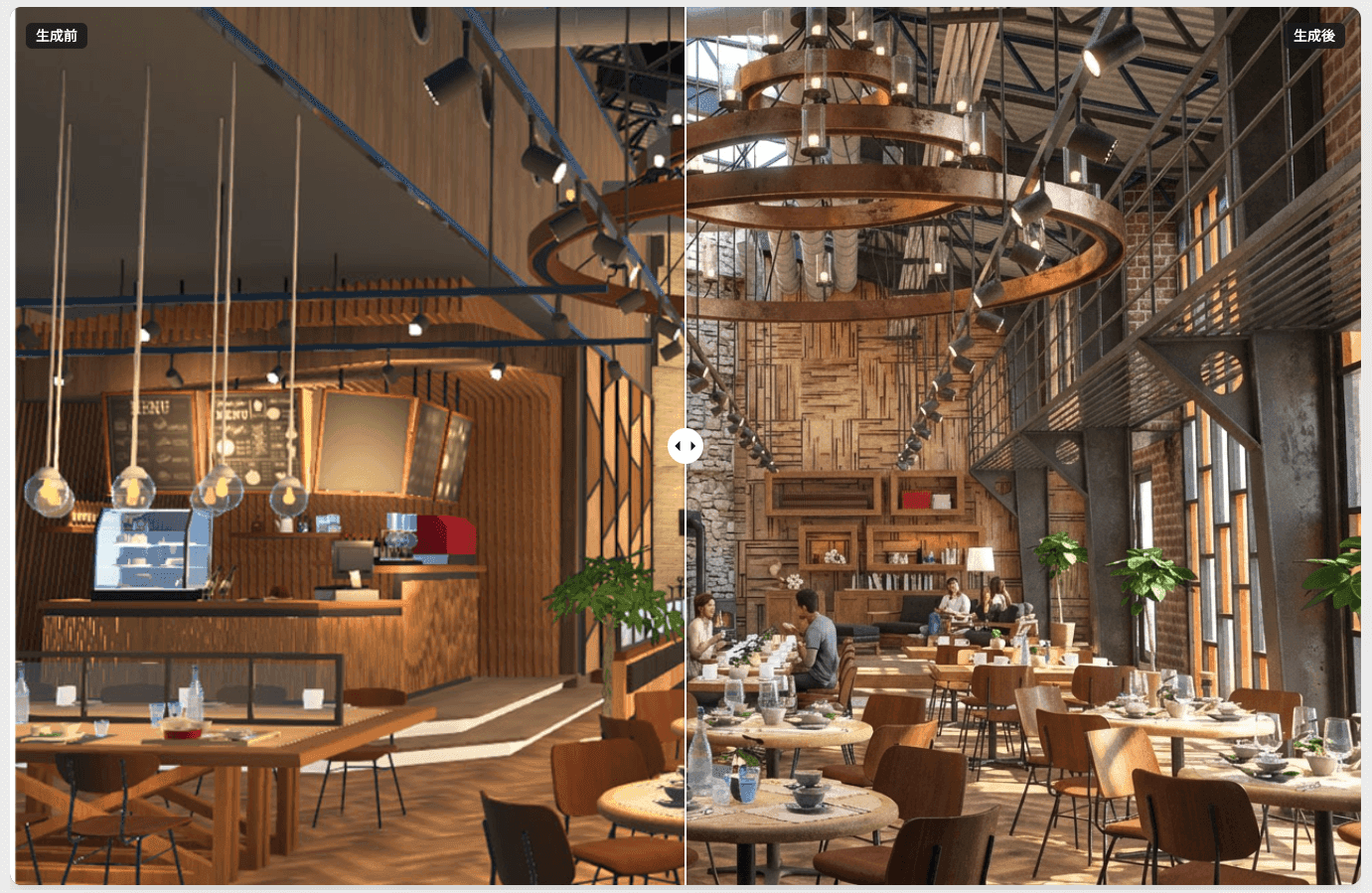
One of the most common frustrations with AI image generation is that uploading a 3D model screenshot often results in unintended shape changes or material mismatches. Rough CG mode is specifically designed to preserve the geometry and composition of your existing model while converting it to a photorealistic render.
Any 3D software works - no special export required
ArchiX reads the image itself, not the source file, so there are no software restrictions. A screenshot of your working viewport is all you need. No expensive rendering plugins, no complex export settings.
Compatible input sources include:
- SketchUp viewport captures
- Revit, ArchiCAD, AutoCAD 3D views
- Blender, 3ds Max, Cinema 4D modeling-stage screenshots
- Lumion, Twinmotion preview renders
It also works with models that aren't finished yet:
- White models with no materials or color applied
- Placeholder materials or rough textures
- Unlit scenes with no lighting or shadow configuration
Use Case: Exterior and Interior Early-Stage Proposals


- Before: Low-budget renders looked obviously CG, making it hard to convey warmth or atmosphere to clients. Higher-quality output required expensive hardware and significant time investment.
- After: Upload a model screenshot, select Rough CG mode, and ArchiX generates a photorealistic version while preserving your original geometry.
- Result: Shape accuracy is maintained, and the visual quality improves dramatically. Multiple interior styles - modern, Scandinavian, industrial - can be generated and compared in the same meeting.
2. Floor Plan to 3D (Beta): Bring Any Drawing to Life
"Can ArchiX turn a floor plan into a 3D image?" has been the most frequently requested feature. The answer is now yes. Upload a floor plan and ArchiX reads the room divisions and spatial logic, then generates a colorized 3D layout complete with furniture and materials.
Works with any floor plan format
ArchiX analyzes the uploaded image rather than the source file, so the tool you used to create the drawing doesn't matter.
Compatible sources include:
- CAD software: Jw_cad, AutoCAD, Vectorworks, DraCAD, and others
- BIM software: 2D plans exported from Revit or ArchiCAD
- Design tools: Floor plans created in Adobe Illustrator, Photoshop, or cloud-based room planning tools
- Other formats: Simple Excel layouts, or clean scanned hand-drawn plans
Use Case: Real Estate and Renovation Proposals

- Before: A renovation proposal supported only by a faded black-and-white floor plan. Clients heard explanations like "this is the living area" but couldn't picture the space, the scale, or how furniture would fit - leading to extended decision-making timelines.
- After: Upload the floor plan to Floor Plan to 3D. The line drawing becomes a visual layout with flooring, furniture placement, and room context.
- Result: Clients who have no background in reading drawings can immediately understand the space and picture themselves living in it. Proposals stand out against competitors and contribute to faster, more confident decisions.
This feature is currently in Beta. Future updates will include support for custom camera angles and additional output options, shaped by user feedback.
3. 4K Upscaling: From Screen to Print Without Compromise
AI-generated renders can look excellent on screen but fall short when scaled up for print - pixels become visible and the image loses its impact. The upscaling feature resolves this by enhancing any generated render to up to 4K resolution within ArchiX, with no need for external image editing software.
Use Case: Competition Boards and Printed Proposal Materials

- Before: Laying out an AI render on an A3 or A1 presentation board revealed pixelation when scaled up, undermining the quality of the overall proposal. Getting a clean print required running the image through a separate editing tool.
- After: Select any generated render and upscale it with one click. Textures, lighting detail, and fine material finishes are all sharpened in the output.
- Result: The exported file holds up at A3 and beyond - suitable for printed brochures, on-site completion boards, and competition presentation panels. The quality of the detail reinforces the strength of the proposal.
These three features address some of the most consistent friction points in the design-to-proposal workflow: renders that don't communicate warmth, floor plans that clients can't read, and images that degrade when printed.
If you haven't signed up yet, you can get started free with a two-week trial, which includes 1,000 credits.

Already using ArchiX? If you'd like a walkthrough of these features or want to get more out of the platform, we offer online demos tailored to your workflow. Book a session using the link below.